For iPhone users who log water: ten Health terms in plain words, plus a 6-point setup check.
0of 6
Tick what is already true on your iPhone.
Free on iPhone · no account
What is dietary water in Apple Health?
Dietary water is Apple Health's name for the water you drink: a running record of amounts that you, your iPhone or a water app logged, shown in the Health app as Water under Nutrition.Apple's HealthKit documentation (2026) describes it as a sample type that “measures the amount of water consumed”, using volume units and cumulative values. It is a log of drinking, not a sensor reading of your body.
Updated November 2026 · Checked against Apple's developer and support pages
The Apple Health water glossary: 10 terms
Read top to bottom: each card builds on the one before. Once you know sources and priority, double counts stop being a mystery.
01
Dietary water
The Health data type for water you drink. Apple defines it as a sample type that “measures the amount of water consumed”. Apps write to it; Health shows it as Water.
It is drinking water you or an app recorded, not a measurement of your body.
02
Water (Nutrition)
Where dietary water appears in the Health app: Browse, then Nutrition, then Water. Charts, daily totals and the list of entries live here.
Same data, friendlier name.
03
Sample
One entry: an amount, a start time and the app or person that wrote it. Logging a 16 oz bottle in Dropkin writes one sample of 16 fl oz.
Every drink is one row of data.
04
Cumulative
Water samples add up. Apple's documentation says dietary water measures cumulative values, so Health shows a daily total rather than an average.
Water is summed, not averaged.
05
Volume units
Dietary water uses volume units: fluid ounces, cups, milliliters or liters. Health can display it in whichever unit you pick, without changing the data.
Ounces or liters is a display choice.
06
Data source
The app, device or person that wrote a sample. Each entry in Show All Data names its source, so you can see which app logged which drink.
Every sample has an author.
07
Source priority
When several sources write the same type, Apple says “the data source at the top will take priority over others”. By default manual entries come first, then Apple devices, then apps.
The top of the list wins on overlap.
08
Data Sources & Access
The screen inside each data type where you reorder sources or switch an app off. Browse, Nutrition, Water, scroll down, Data Sources & Access, Edit.
This is where you fix double counts.
09
Write-only sync
An app that adds water to Health but does not read it back. Dropkin works this way: it saves dietary water, and updates or removes its own samples when you edit or delete a drink.
Health hears from the app; the app does not read Health.
10
Manual entry
Water you type straight into the Health app with Add Data. It is labeled as entered by you and sits at the top of the default priority order.
Fine for one-offs; tedious every day.
Dietary water questions
What is dietary water in Apple Health?
It is the Health data type for water you drink. Apps such as water trackers write each drink to it, and the Health app shows the total under Nutrition as Water. It records what you logged, not how hydrated your body is.
Why is my water counted twice in Apple Health?
Usually two sources wrote the same drinks, for example a water app plus a manual entry, or two water apps. Open Browse, Nutrition, Water, then Data Sources & Access, and turn off or reorder the extra source. Apple says the source at the top takes priority.
Does coffee count as dietary water?
In Health, dietary water is whatever you or your app log as water; caffeine and other drinks have their own types. For your own goal, Mayo Clinic (January 2026) says tea, coffee and milk count toward how much you drink each day, and food provides about 20% of the water you need.
How much dietary water should I log each day?
There is no single number. Mayo Clinic (January 2026) says some studies suggest about 2.7 to 3.7 liters of total fluid a day for the average healthy adult, from all drinks and food. Your clinician can tell you what fits you, especially with heart, kidney or other conditions.
Does Dropkin read my water from Apple Health?
No. Apple Health sync in Dropkin is optional and write-only. It saves dietary water and updates or removes its own samples when you edit or delete a drink, but it does not import drinks logged by other apps.
Can my Apple Watch log water?
Not by itself, but water apps with a watch app can. Dropkin's Apple Watch app logs your pinned bottle, quick amounts or a Digital Crown custom amount, and drinks sync to your iPhone and are counted once.
Is dietary water health advice?
No. It is a record. This is general information, not medical advice. Talk to your clinician.
Honest limits
Dropkin writes water to Health but never reads from it, so drinks from other apps won't show up inside Dropkin.
Health sync is off until you turn it on.
Dropkin tracks a goal you choose. It is not a medical device and does not work out your hydration needs.
The tracker is free. Optional Pro adds extra worlds, styles and 90-day or full-year history.
Who this is not for
If you need a fluid limit or a precise intake chart for a medical reason, follow your care team's method; a hospital chart may ask for every cup, soup and ice chip. If you already log water happily in another app that reads Health, keep it. Dropkin suits people who drink from the same few bottles and want one tap per refill.
What the setup check is really testing
The six ticks above map to the glossary. Units and goal are display choices you control. The middle four are about sources: one writer, a known priority order, no hand-typed duplicates, and edits that flow through. Score five or six and your Water chart in Health is telling the truth. Below four, start with Data Sources & Access.
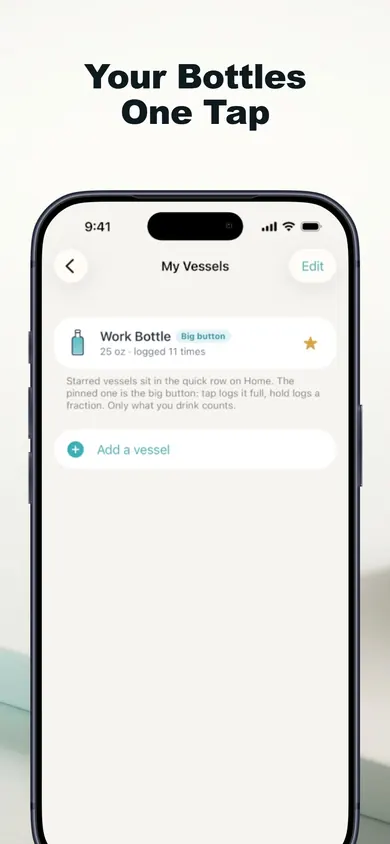
A saved bottle: one tap writes one sample of its real size.
Three ways to get water into Apple Health
Type it into Health
Smart bottle app
Dropkin
Taps per drink
Several (Add Data, amount, save)
None once paired
One for a saved bottle
Cost
Free
Bottle purchase
Free; optional Pro
Reminders
None
Bottle glow or app
Only in your hours, stop at goal
Writes to Health
Yes, as you
Depends on the app
Yes, optional, write-only
Simple rule: pick one writer for water, and let Health just collect.
How to send water to Apple Health in 3 steps
Save your bottle. In Dropkin, add the bottle or glass you use with its real capacity and pin it.
Turn on Apple Health. In Dropkin settings, allow it to write water. It asks only to write, not read.
Check the source list once. In Health, open Water, then Data Sources & Access, and make sure only one app is counting your drinks.
Download free on the App Store
One tap per bottle, a clean Water chart in Health, and reminders that go quiet once you're on pace.
How to remember to drink water at workBusy desk day, full bottle at 4 p.m.? Flip four office water myths, then plan refill cues around your real work hours. Free tool.